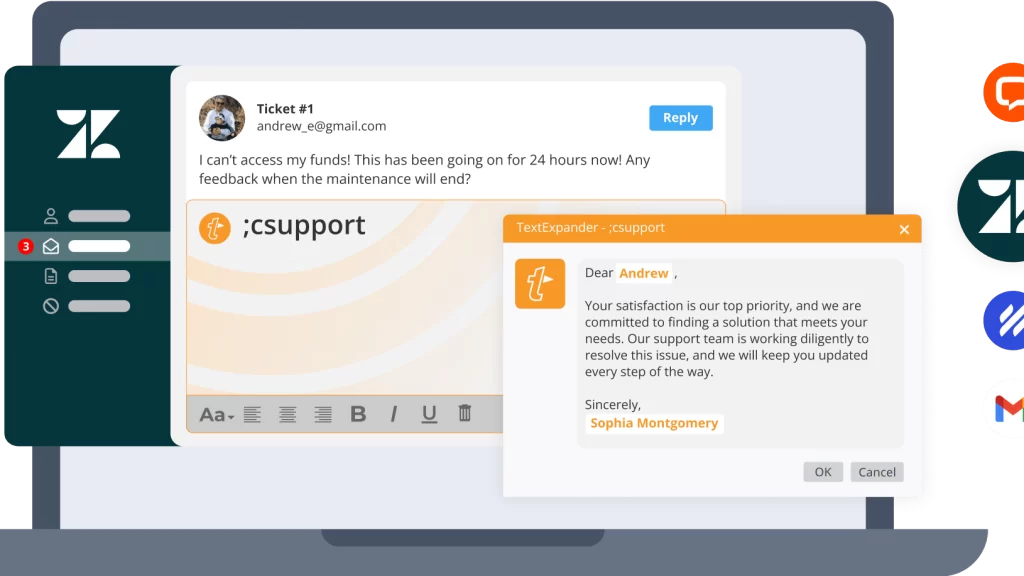
A single keystroke shortcut can expand into a full customer onboarding email, complete with customizable fill-in-the-blank fields. In modern business communication, repetitive typing consumes measurable hours each week, making the TextExpander shortcut app a focused solution for professionals looking to organize and standardize their written output.
Rather than continually drafting similar responses, users build a centralized repository of frequently typed phrases, URLs, codes, and messaging templates. When navigating the modern digital workspace, having pre-formatted responses ready to deploy across desktop and web applications prevents formatting inconsistencies and eliminates routine manual errors.

How Dynamic Snippets Accelerate Everyday Writing
At the center of the platform is the snippet architecture. Users create short abbreviations that immediately trigger larger passages of text anywhere they type. These are not limited to static phrases; snippets can integrate automated date formatting, dynamic cursors, and custom blank fields that prompt the user for specific client details before expanding.
For individuals juggling administrative tasks, investing attention into repetitive typing tools pays immediate dividends. Rather than digging through sent folders or note apps to locate boilerplate responses, you summon vetted copy with a few characters. You can explore the platform directly through TextExpander to view their starter setup and cross-device options.
Key Features of the TextExpander Shortcut App
Beyond individual shorthand, the service is engineered to scale across diverse operating systems and enterprise applications. It functions across Windows, Mac, Chrome, and mobile environments, integrating directly with platforms like Zendesk, Salesforce, Epic, Cerner, and HelpScout.
A notable feature within the ecosystem is AI Recommendations available for Chrome, which identifies contextual workflow patterns and surfaces relevant snippets precisely when they are needed. This contextual discovery reduces the friction of memorizing hundreds of custom shortcuts, keeping essential communication frameworks within immediate reach.
For growing organizations, snippet libraries can be shared and updated globally. When messaging guidelines, technical specifications, or compliance standards change, team leads adjust the master text. This update reflects instantly across every team member’s device, ensuring that customer support, recruiting, and operations teams maintain unified brand voice without manual retraining.
Deciding If Snippet Management Fits Your Workflow
Determining whether snippet management fits your routine depends heavily on your daily volume of correspondence and documentation. Solo operators and freelancers managing regular client outreach benefit from setting up basic intake templates, scheduling links, and invoice text. Because there is a free-tier entry without credit card requirements, individuals can test custom text snippets before deciding to expand their organizational usage.
Teams handling high-stakes communication—such as healthcare groups charting patient interactions or enterprise support teams resolving tickets—find value in governance controls. The platform offers SOC 2, SOC 3, and HIPAA compliance, alongside enterprise features such as single sign-on (SSO), SCIM provisioning, and detailed usage reporting. You can review enterprise options and integrations at TextExpander to understand their data protections.
If your daily output involves substantial copying and pasting, evaluating the TextExpander shortcut app offers a practical path toward cleaner communication and reduced keyboard strain.
Leave a Reply